The cloud computing revolution has transformed how organizations build and deploy artificial intelligence solutions. Microsoft Azure stands at the forefront of this transformation, offering a comprehensive suite of AI services that democratize access to powerful machine learning capabilities. Understanding ai azure fundamentals has become essential for professionals seeking to build intelligent applications, automate business processes, or earn industry-recognized certifications. Whether you're a developer transitioning into AI, a business analyst evaluating cloud platforms, or a team leader planning organizational upskilling initiatives, mastering these foundational concepts opens doors to career advancement and innovation. This comprehensive guide explores the core principles, services, and practical applications that define Azure's AI ecosystem in 2026.
Understanding the Azure AI Ecosystem
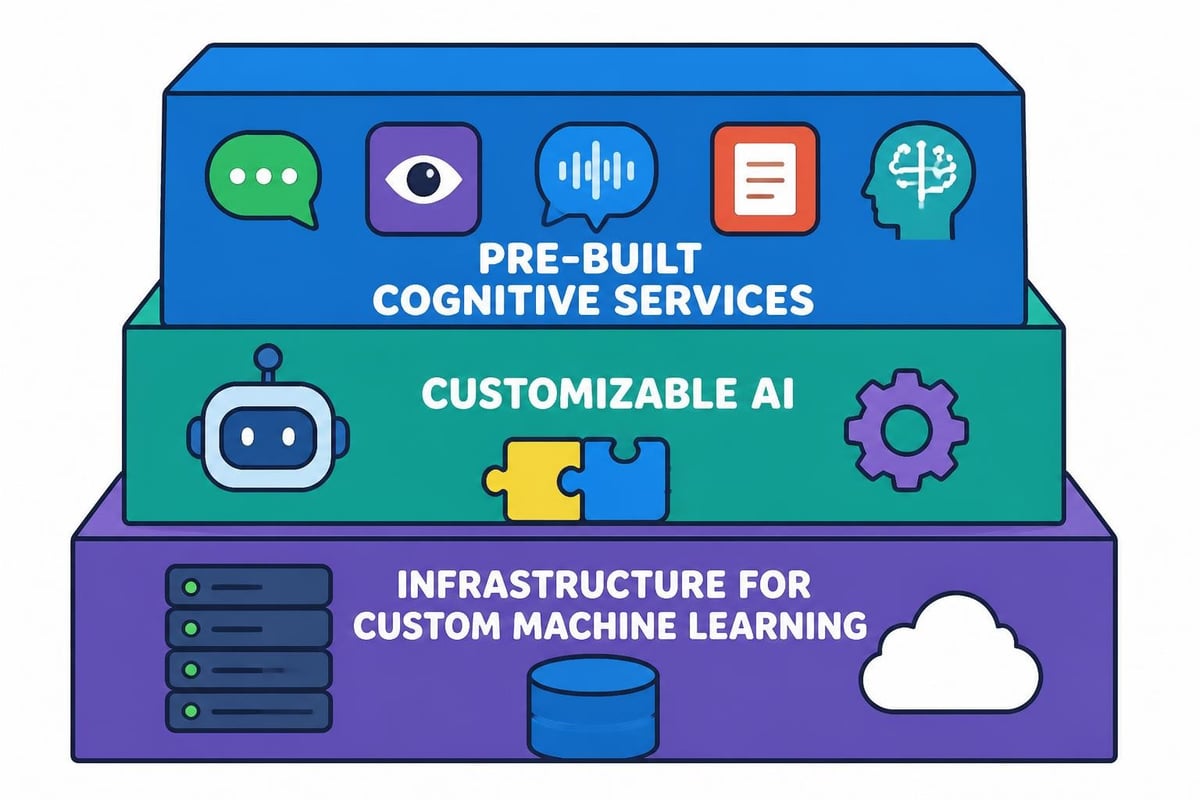
Microsoft Azure provides a layered approach to artificial intelligence that accommodates users at every skill level. The platform architecture separates concerns into distinct service categories, each addressing specific use cases and technical requirements.
Core AI Service Categories
Azure organizes its AI capabilities into four primary pillars that serve different business needs and technical scenarios:
- Cognitive Services: Pre-built APIs for vision, speech, language, and decision-making
- Azure Machine Learning: End-to-end platform for building custom ML models
- Azure Bot Service: Framework for creating conversational AI experiences
- Azure Applied AI Services: Industry-specific solutions combining multiple AI capabilities
The ai azure fundamentals framework emphasizes accessibility through various consumption models. Teams can leverage pre-trained models through simple API calls, customize existing models with transfer learning, or build entirely custom solutions using Azure Machine Learning workspaces.
Machine Learning Workload Types
Understanding workload classifications helps organizations select appropriate Azure services for their requirements:
| Workload Type | Description | Primary Azure Service | Use Case Example |
|---|---|---|---|
| Computer Vision | Image and video analysis | Azure Computer Vision | Quality inspection automation |
| Natural Language Processing | Text understanding and generation | Azure Language Service | Customer sentiment analysis |
| Speech Processing | Audio transcription and synthesis | Azure Speech Service | Call center transcription |
| Decision Support | Personalization and anomaly detection | Azure Personalizer | Product recommendations |
Each workload type requires different data preparation strategies, evaluation metrics, and deployment considerations. The Microsoft Azure AI Fundamentals certification validates comprehensive understanding across all these categories.
Essential Concepts in Azure AI
Building effective AI solutions requires mastery of foundational concepts that underpin all Azure AI services. These principles guide model selection, data preparation, and responsible deployment practices.
Supervised vs. Unsupervised Learning
Azure Machine Learning supports both primary learning paradigms, each suited to different business problems.
Supervised learning requires labeled training data where correct answers are provided. Classification models predict categorical outcomes (spam or not spam), while regression models predict continuous values (sales forecasts). Azure AutoML can automatically test dozens of algorithms against your labeled dataset to identify the optimal approach.
Unsupervised learning discovers patterns in unlabeled data. Clustering algorithms group similar items without predefined categories, useful for customer segmentation or anomaly detection in manufacturing processes.
Many professionals pursuing AI and ML learning paths begin with supervised learning projects because the evaluation metrics provide clear feedback on model performance.
Training, Validation, and Testing
Proper data splitting prevents overfitting and ensures models generalize to new scenarios:
- Training set (70-80%): Data used to teach the model patterns
- Validation set (10-15%): Data for tuning hyperparameters and preventing overfitting
- Test set (10-15%): Hold-out data for final performance evaluation
Azure Machine Learning pipelines automate this splitting process and track experiments across multiple iterations. The platform maintains complete lineage from raw data through deployed endpoints, essential for regulated industries.
Responsible AI Principles
Microsoft embeds six core principles into ai azure fundamentals that guide ethical AI development:
- Fairness: Models should treat all people equitably
- Reliability and Safety: Systems must perform consistently under various conditions
- Privacy and Security: User data requires protection through encryption and access controls
- Inclusiveness: AI should benefit everyone regardless of physical ability
- Transparency: Users deserve to understand how AI systems make decisions
- Accountability: Organizations must answer for their AI systems' outcomes
Azure provides built-in tools like the Fairness dashboard to measure and mitigate bias across demographic groups. These capabilities help organizations meet regulatory requirements while building user trust.
Azure Cognitive Services Deep Dive
Cognitive Services represent the fastest path to adding AI capabilities to applications. These pre-trained models handle complex tasks through simple REST API calls, eliminating months of development time.
Vision Services
Azure Computer Vision analyzes visual content with remarkable accuracy:
Image Analysis extracts information from images including objects, brands, faces, and adult content flags. Retail applications use this for automated product tagging, while media companies implement content moderation at scale.
Optical Character Recognition (OCR) extracts text from images and PDFs in over 120 languages. Financial institutions process loan documents, while logistics companies digitize shipping manifests automatically.
Face Detection identifies and analyzes human faces, providing attributes like age estimation, emotion detection, and facial landmarks. Security applications verify identity, while marketing teams measure engagement in digital experiences.
Language Services
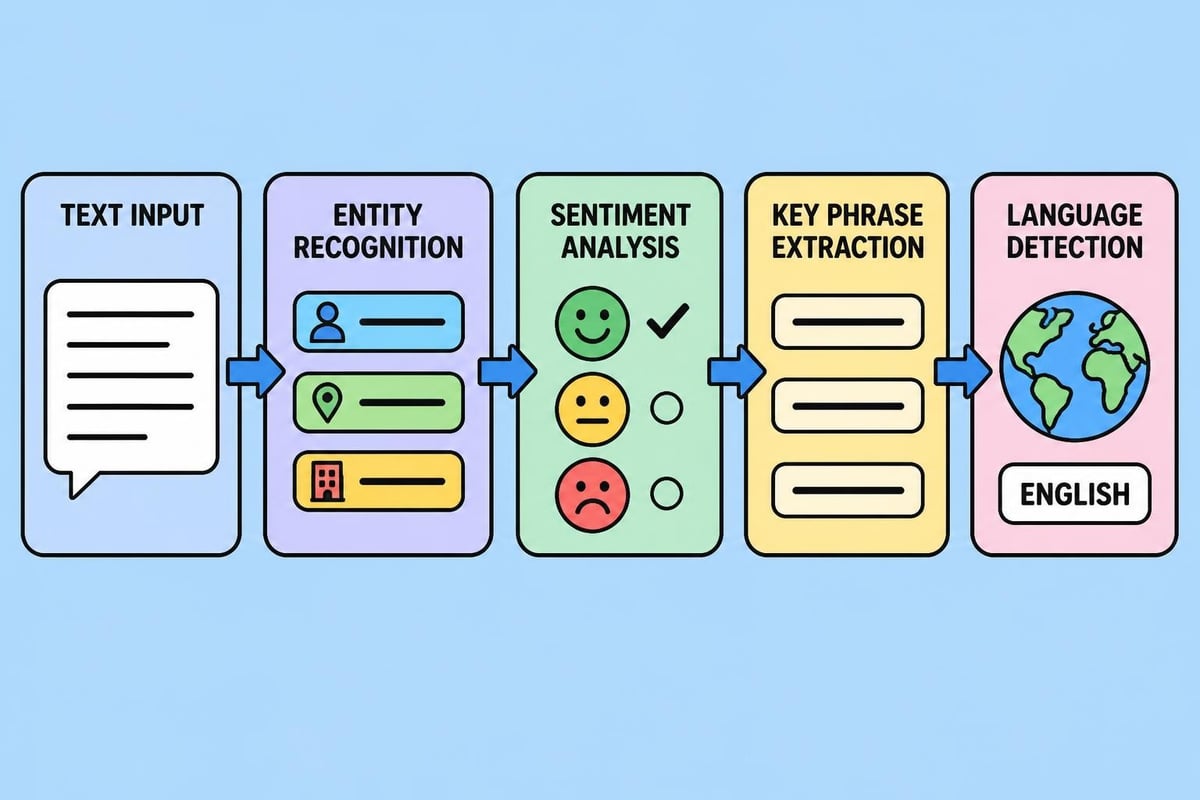
Azure Language Service provides sophisticated text analytics capabilities:
- Sentiment Analysis: Classifies text as positive, negative, or neutral with confidence scores
- Key Phrase Extraction: Identifies main talking points in documents
- Named Entity Recognition: Detects people, places, organizations, and dates
- Language Detection: Identifies which of 120+ languages a text uses
- Question Answering: Creates conversational AI from FAQ documents
Organizations implementing conversational AI solutions frequently combine Language Service with Bot Framework to create sophisticated customer service experiences. The service handles intent recognition while developers focus on business logic.
Speech Services
Azure Speech Service bridges the gap between audio and text:
Speech-to-Text transcribes audio in real-time or batch mode, supporting custom vocabulary for industry terms. Healthcare providers transcribe patient encounters, while journalists transform interviews into searchable text.
Text-to-Speech generates natural-sounding audio in 290+ voices across 119 languages. Educational platforms create accessible content, while automotive systems provide spoken navigation.
Speech Translation converts spoken language to text in different languages simultaneously, enabling real-time multilingual meetings and global customer support.
Azure Machine Learning Platform
While Cognitive Services solve common problems, many organizations require custom models trained on proprietary data. Azure Machine Learning provides enterprise-grade infrastructure for the complete machine learning lifecycle.
Automated Machine Learning (AutoML)
AutoML democratizes machine learning by automating model selection and hyperparameter tuning. Users provide a labeled dataset, specify the prediction target, and AutoML tests dozens of algorithms to find the optimal approach.
The process includes:
- Data preprocessing: Handling missing values, encoding categories, scaling features
- Feature engineering: Creating new predictive variables from existing data
- Model selection: Testing classification, regression, or forecasting algorithms
- Hyperparameter optimization: Fine-tuning each model's configuration
- Ensemble creation: Combining multiple models for improved accuracy
AutoML explains which features most influence predictions, helping data scientists understand model behavior. This transparency supports regulatory compliance and builds stakeholder confidence.
Designer Interface
The Azure Machine Learning Designer provides a visual canvas for building ML pipelines without writing code. Users drag and drop components for data transformation, model training, and evaluation.
| Component Type | Purpose | Example Use |
|---|---|---|
| Data Input/Output | Load and save datasets | Import from Azure SQL Database |
| Data Transformation | Clean and prepare data | Remove duplicates, normalize values |
| Model Training | Build predictive models | Train decision tree classifier |
| Model Scoring | Generate predictions | Apply model to new customer data |
| Evaluation | Assess performance | Calculate accuracy and precision |
The Designer converts visual pipelines into Python code, helping beginners understand the underlying implementation. Professionals preparing for Microsoft AI certification programs often start with Designer before advancing to notebook-based development.
Python SDK and Notebooks
For maximum flexibility, Azure Machine Learning supports Python development through Jupyter notebooks. The Azure ML SDK provides classes for:
- Workspace management: Organizing experiments, datasets, and compute resources
- Data access: Reading from Azure Blob Storage, Data Lakes, and databases
- Experiment tracking: Logging metrics, parameters, and artifacts
- Model registration: Versioning trained models with metadata
- Deployment: Creating REST endpoints for real-time or batch scoring
Integrated compute instances provide pre-configured environments with popular libraries (scikit-learn, TensorFlow, PyTorch) installed. Teams can scale training across GPU clusters for deep learning workloads or use CPU clusters for traditional machine learning.
Bot Framework and Conversational AI
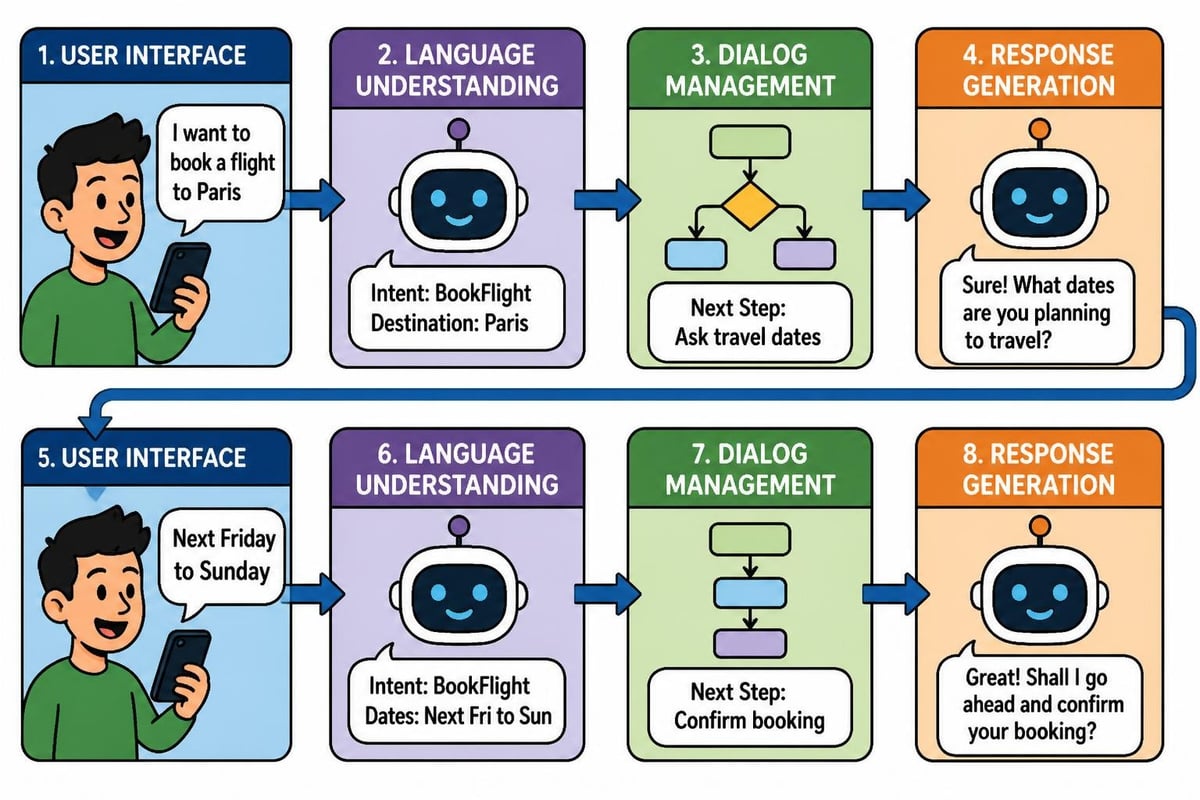
Azure Bot Service enables creation of intelligent conversational agents that communicate through text, speech, or visual interfaces. Understanding ai azure fundamentals includes recognizing how bots combine multiple AI services.
Bot Components
Effective bots integrate several Azure capabilities:
Language Understanding (LUIS) extracts intent and entities from user messages. A travel bot recognizes "book flight to Paris" should trigger flight search with destination entity "Paris."
QnA Maker generates conversational layers over knowledge bases. Support bots answer common questions by searching FAQ documents, technical manuals, or knowledge articles.
Channels connect bots to user interfaces including Microsoft Teams, Slack, Facebook Messenger, websites, and mobile apps. A single bot codebase serves multiple platforms simultaneously.
Conversation Flow Design
Professional bot development follows structured patterns:
- Greeting: Welcome users and explain capabilities
- Intent recognition: Understand what users want to accomplish
- Information gathering: Collect required parameters through questions
- Action execution: Process requests using backend systems
- Confirmation: Verify completion and offer additional help
Azure Bot Framework handles conversation state management, tracking context across multiple turns. This enables natural dialogs where users can reference previous topics without repetition.
Preparing for AI-900 Certification
The Microsoft Certified: Azure AI Fundamentals certification validates foundational knowledge of AI concepts and Azure AI services. This credential benefits professionals across roles including developers, data scientists, solution architects, and business decision-makers.
Exam Structure and Topics
The AI-900 exam covers four primary domains:
| Domain | Weight | Key Topics |
|---|---|---|
| AI Workloads and Considerations | 15-20% | Machine learning types, responsible AI |
| Machine Learning on Azure | 30-35% | AutoML, Designer, model training |
| Computer Vision Workloads | 15-20% | Image classification, object detection, OCR |
| Natural Language Processing | 15-20% | Text analytics, translation, conversational AI |
Candidates should understand when to apply each service rather than memorizing technical implementation details. The exam emphasizes business scenarios and appropriate service selection.
Effective Study Strategies
Successful candidates combine multiple learning approaches:
Microsoft Learn paths provide free, self-paced modules with hands-on exercises in Azure sandbox environments. The official learning path covers all exam objectives with practical labs.
Video courses offer structured instruction from experienced trainers. Platforms like edX provide Microsoft-authorized content aligned with certification requirements.
Practice assessments identify knowledge gaps before the actual exam. Taking multiple practice tests helps candidates become comfortable with question formats and time management.
Hands-on projects solidify understanding better than passive reading. Building a simple image classifier, creating a chatbot, or implementing text sentiment analysis reinforces theoretical concepts. Many learners exploring artificial intelligence courses appreciate this practical emphasis.
Real-World Implementation Scenarios
Understanding ai azure fundamentals becomes valuable when applied to actual business challenges. These scenarios demonstrate how organizations leverage Azure AI services to drive measurable outcomes.
Retail Customer Insights
A global fashion retailer implemented Azure Text Analytics to analyze customer reviews across e-commerce platforms. The solution processes 50,000+ reviews daily, extracting:
- Overall sentiment scores to identify problematic products
- Key phrases highlighting specific complaints or praise
- Entity recognition for mentioned brands, colors, and sizes
Marketing teams receive automated alerts when sentiment drops below thresholds, enabling rapid response to quality issues. Product development teams analyze key phrases to understand feature preferences across demographics.
The implementation required minimal development effort. REST API calls to Language Service returned structured JSON responses that integrated with existing business intelligence dashboards.
Healthcare Document Processing
A hospital network deployed Azure Form Recognizer to digitize paper medical records. The custom model training process included:
- Uploading 50 sample forms showing field variations
- Labeling key fields (patient name, diagnosis codes, medications)
- Training a custom extraction model in under 30 minutes
- Deploying the model as a REST endpoint
Processing accuracy exceeded 95% for typed forms and 88% for handwritten records. The system now processes 10,000 documents monthly, reducing manual data entry costs by 60% while improving record accuracy.
Manufacturing Quality Control
An electronics manufacturer uses Azure Custom Vision to detect product defects on assembly lines. Training the model involved:
- Photographing 500 acceptable products and 500 defective units
- Uploading images to Custom Vision portal with appropriate tags
- Training classification model with automatic test set evaluation
- Deploying to edge devices for real-time inspection
The system identifies defects with 94% accuracy, flagging items for human review. Integration with manufacturing execution systems automatically reroutes defective products, reducing waste and improving quality consistency.
Advanced Azure AI Capabilities
Beyond fundamental services, Azure provides specialized capabilities for complex AI scenarios that address enterprise-scale requirements.
Responsible AI Tools
Azure Machine Learning includes built-in tools for implementing responsible AI practices:
Fairness assessment measures model performance across demographic groups, highlighting disparate impact. A loan approval model might achieve 85% accuracy overall but only 75% for certain populations, indicating bias requiring mitigation.
Model interpretability explains individual predictions using SHAP values or LIME techniques. This transparency helps stakeholders understand why an AI system recommended specific actions.
Error analysis identifies systematic failure patterns by slicing performance across feature combinations. Understanding where models struggle guides data collection and feature engineering priorities.
MLOps and Model Management
Production AI systems require governance and operational rigor comparable to traditional software:
- Model versioning: Track changes across iterations with complete lineage
- Automated retraining: Schedule model updates as new data arrives
- A/B testing: Compare champion and challenger models in production
- Monitoring and alerts: Track prediction drift and data quality issues
- Compliance controls: Enforce policies for model approval and deployment
Azure Machine Learning manages these concerns through integrated DevOps pipelines. Teams define workflows that automatically retrain models when accuracy degrades, requiring human approval before production deployment.
Custom Neural Networks
While pre-built services handle common scenarios, some applications require purpose-built deep learning architectures. Azure supports TensorFlow, PyTorch, and other frameworks through:
Compute instances provide development environments with pre-installed libraries and GPU access. Data scientists prototype models in Jupyter notebooks with familiar tools.
Compute clusters scale training across multiple GPUs or nodes for large datasets. A model requiring 48 hours on a single GPU might complete in 6 hours across an 8-GPU cluster.
Inference clusters deploy trained models as scalable web services with load balancing and auto-scaling. High-traffic applications serve millions of predictions daily with consistent latency.
Organizations building specialized AI applications often combine these infrastructure capabilities with domain expertise. Teams working on AI and robotics integration particularly benefit from this flexibility.
Cost Optimization Strategies
Azure AI services follow consumption-based pricing models that require strategic planning for budget control. Understanding these patterns helps organizations maximize value while managing expenses.
Service Tier Selection
Most Azure AI services offer multiple pricing tiers:
| Tier | Characteristics | Best For |
|---|---|---|
| Free | Limited transactions, shared resources | Learning and proof-of-concept |
| Standard | Pay-per-transaction, dedicated resources | Production workloads with variable usage |
| Commitment | Discounted rates for volume commitment | Predictable, high-volume scenarios |
Development environments typically use free tiers during initial exploration, transitioning to standard tiers for production. High-volume applications benefit from commitment tiers that reduce per-transaction costs by 30-50%.
Resource Management Best Practices
Several strategies minimize unnecessary costs:
- Auto-shutdown policies: Stop compute instances during non-business hours
- Batch processing: Aggregate requests instead of real-time processing where latency permits
- Caching: Store and reuse results for identical requests
- Right-sizing: Match compute resources to actual performance requirements
- Data lifecycle management: Archive or delete obsolete datasets and models
Azure Cost Management provides spending analytics and budget alerts. Teams set monthly thresholds and receive notifications when approaching limits, preventing surprise charges.
Integration with Existing Systems
Azure AI services maximize value when connected to business applications and data platforms. The ecosystem provides multiple integration patterns supporting diverse architectures.
API Integration Patterns
REST APIs enable language-agnostic integration. A Python web application, Java backend service, or .NET desktop application can all consume the same Azure Cognitive Service through HTTP requests.
SDKs provide language-specific abstractions that simplify common tasks. Instead of constructing raw HTTP requests, developers call typed methods with IntelliSense support and error handling.
Data Platform Connectivity
Azure AI services integrate natively with Microsoft data platforms:
- Azure SQL Database: Train models on relational data without moving it
- Azure Data Lake: Process petabyte-scale datasets for big data ML scenarios
- Azure Synapse Analytics: Combine data warehousing with machine learning
- Power BI: Embed predictions directly in business intelligence reports
This tight integration reduces data movement costs and simplifies security management. Organizations maintain a single set of credentials and access controls across analytics and AI workloads.
Event-Driven Architectures
Azure Event Grid and Service Bus enable real-time AI processing:
- Application publishes event (new image uploaded, document received)
- Event triggers Azure Function containing AI service call
- AI service analyzes content and returns results
- Function stores enriched data or triggers downstream actions
This serverless pattern scales automatically with demand, processing one document or one million with identical architecture.
Building Your AI Azure Skills
Mastering ai azure fundamentals requires structured learning combined with hands-on practice. Successful learners follow progressive skill-building paths that align with career objectives.
Learning Path Recommendations
Entry-level professionals should begin with conceptual understanding before advancing to implementation:
Foundations (Weeks 1-2): Study AI workload types, machine learning concepts, and responsible AI principles through Microsoft's official training materials.
Service Exploration (Weeks 3-4): Experiment with Cognitive Services APIs in the Azure portal. Build simple applications using Computer Vision, Text Analytics, and Speech Services.
Custom Models (Weeks 5-6): Create classification models using Azure Machine Learning Designer. Progress to AutoML for regression and forecasting scenarios.
Integration Projects (Weeks 7-8): Develop end-to-end solutions connecting AI services to data sources and business applications. Document your work in a portfolio.
Professionals seeking comprehensive AI management training benefit from this structured progression that builds confidence through incremental complexity.
Hands-On Practice Environments
Azure provides several options for risk-free experimentation:
Free tier services allow limited usage without charges. Most Cognitive Services include thousands of free monthly transactions sufficient for learning and small projects.
Azure for Students grants $100 credit to verified students without requiring a credit card. This supports semester-long projects and certification preparation.
Azure free account provides $200 credit valid for 30 days plus 12 months of popular services. New users can explore extensively before committing to paid subscriptions.
Sandbox environments in Microsoft Learn modules provide temporary Azure access for guided exercises. Complete entire labs without configuring personal subscriptions.
Community and Support Resources
Learning accelerates through community engagement:
- Microsoft Q&A forums: Ask technical questions answered by Microsoft engineers and MVPs
- Azure documentation: Comprehensive guides with code samples in multiple languages
- GitHub repositories: Example implementations and starter templates
- User groups: Local meetups and virtual events connecting Azure practitioners
Many learners supplement formal training with YouTube tutorials providing alternative explanations and real-world demonstrations.
Career Opportunities and Market Demand
Proficiency in ai azure fundamentals opens diverse career paths as organizations accelerate AI adoption. Understanding market dynamics helps professionals position themselves strategically.
Role Specializations
Azure AI expertise supports multiple career trajectories:
AI Engineers design and implement custom machine learning solutions using Azure ML platform. They handle data pipeline construction, model training, and production deployment.
Data Scientists focus on statistical modeling and algorithm selection. Azure provides the infrastructure while data scientists contribute domain expertise and analytical rigor.
AI Consultants guide organizations through AI strategy, service selection, and implementation planning. They translate business requirements into technical architectures.
Solutions Architects design comprehensive systems integrating AI with existing applications, data platforms, and security frameworks.
Entry-level positions often require foundational certifications like AI-900, while senior roles expect advanced credentials and project portfolios. Professionals exploring AI specialization courses should align selections with target roles.
Salary and Growth Trends
The Bureau of Labor Statistics projects 23% growth in computer and information research scientist positions through 2032. Azure expertise commands premium compensation:
- Entry-level AI Engineers: $85,000-$110,000 annually
- Mid-career Data Scientists: $120,000-$150,000 annually
- Senior Solutions Architects: $150,000-$200,000+ annually
Geographic location, industry sector, and company size significantly influence compensation. Technology hubs and financial services typically offer higher salaries than other markets.
Building Competitive Advantage
Professionals differentiate themselves through:
- Portfolio projects: Demonstrate practical skills with GitHub repositories showing working code
- Certifications: Validate knowledge with Microsoft credentials and complementary certifications
- Industry specialization: Develop domain expertise in healthcare, finance, retail, or manufacturing
- Communication skills: Translate technical concepts for non-technical stakeholders
- Continuous learning: Stay current with quarterly Azure service updates and AI research advances
The AI field evolves rapidly. Committing to ongoing education through platforms offering comprehensive AI training programs sustains career momentum.
Mastering ai azure fundamentals in 2026 provides the foundation for building intelligent applications that transform business operations and create competitive advantages. The combination of accessible pre-built services, powerful custom modeling platforms, and responsible AI tools positions Azure as a comprehensive solution for organizations at any stage of their AI journey. Whether you're pursuing certification, implementing your first AI project, or planning organization-wide upskilling initiatives, MammothClub delivers the structured learning paths, hands-on labs, and expert instruction that accelerate your progress from foundational concepts to production deployment.